qor Health
Would you rather not read this whole thing? Look at some screenshots instead
Executive summary
qor Health is a private, single-user health tracker. It brings the user's body composition, food, movement, sleep, stress, and exercise into one place and tracks them against stated goals.
It is built for one person and shaped by that person's life rather than by the needs of a mass market. It runs on the user's own computer, keeps their data in files they own, and treats them as the authority on their own body. Most health apps are built to maximize engagement and to sell a plan. qor Health is built to answer a quieter question: given everything I have measured and logged, am I actually heading where I want to go?
Three ideas define the product:
- One view instead of five apps. The user's scale, ring, phone step count and meals each live in a different place. qor Health joins them into a single timeline.
- Honest, not judgmental. The review uses plain traffic lights and plain language. It says what is on track, what needs attention and what is simply not known yet.
- Theirs to keep. The user's records stay on their machine and are backed up on their schedule.
Two of the user's devices connect automatically. Steps come from Google Health compatible device (Fitbit, Pixel watch, etc) and sleep comes from an Oura Ring. The Arboleaf smart scale offers no practical way for another program to connect to any external device. The accepted trade-off is a short manual step: the user shares the scans from the scale's app via email and qor Health uses the qor app's existing gmail integration to read the attachment. This paper explains who the product serves, what it does, why that trade-off is acceptable for now, and where it goes next.
Who it is for
The product has one user: an adult who tracks their health deliberately and wants the full picture without the noise.
What the user wants
- To see whether their weight, body composition and waist-to-hip proportions are moving in the intended direction, not just what the scale said this morning.
- To understand how eating, steps, exercise and sleep relate to each other in their own life.
- A trustworthy second opinion that shows normal fluctuations in body composition and the effect of the interplay between sleep, stress, nutrition, and movement.
- To spend a minute or two a day on it, not to manage another hobby.
What the user does not want
- Streaks, badges, nudges, or explicit motivation.
- Calorie targets that ignore age, height, and body composition.
- Sharing capability.
- A product that produces a single number or evaluation point.
Their context. The user is comfortable with technology, owns a smart scale and a ring, and already logs some things by hand. They are an adult with their own history, so the product does not teach them what a healthy life looks like. It shows them where they are and lets them decide.
The problem
The user's health data is scattered across four places. None of them speaks to the others or answers the question the user cares about.
The scale's app shows weight and composition but knows nothing about what the user ate. The ring knows how they slept, but not how they moved or fed themselves. The phone counts steps. A food diary, if the user keeps one, lives somewhere else again. Each app is tuned to keep the user inside it, and each draws its own conclusion from its own slice.
Three frustrations follow:
- No joined-up view. A change in weight cannot be set beside a week of short sleep, a drop in steps and a run of larger meals, because those facts never meet.
- Generic judgment. Consumer apps compare the user to a population average or push a one-size calorie target. They rarely use the user's measured body composition or actual activity.
- Fragile ownership. Years of readings sit on vendor servers. If an app changes, charges, or closes, the user's history can go with it.
The opportunity is a personal tool that does the joining, applies the user's own numbers, and stays under their control.
Product principles
Five principles guide every decision about what qor Health does and does not do.
- The user's numbers, the user's goals. Targets and comparisons come from the user's own measurements, age, height and stated goals. There is no population average standing in for them.
- Hand entry beats a wrong guess. What the user types is never overwritten by an estimate or a sync. Figures that are estimated are visibly marked as estimates.
- Be honest about uncertainty. A rough estimate is labeled rough. A gap in the data is reported as a gap, not filled with a confident answer.
- Low effort, high return. A saved food never has to be looked up twice. Synced data arrives with one button. A minute a day is enough.
- Calm by design. No streaks, no scoring against other people, no alarms. Progress is shown as a trend over time, because a single day says very little.
A sixth, quieter principle sits underneath: the product reports, and the user decides. It is a mirror and a second opinion. It does not diagnose, prescribe or replace the user's clinician.
What qor Health does
qor Health covers five areas of the user's health, each with its own section, and joins them on a shared timeline.
| Area | Data | Input | Output |
| Body composition | Weight, body fat, muscle, metabolic rate and related readings from each scan | Scan files downloaded from the scale's share email, saved to a specified folder, and read from there. | Trend charts over time |
| Food | What the user ate, with an amount and a unit. Configurable protein, fat, and carb macro goals with tracking against each. This is also included in the dashboard widget. | Typed in by hand, one set per date | Daily totals set against the user's recommended dairly needs |
| Movement & Exercise | Daily steps | Synced from Google Fit, or typed in | A steady picture of the user's activity level |
| Sleep | Hours slept each morning for the previous night | Synced from the user's Oura Ring, or typed in | Nightly, and patterns over time. |
| Stress | (For now) Manually input measure from 1 - 5 | Stress level tracked as good <-> bad | Context for the other numbers |
- Body composition. qor Health keeps the full set of readings and shows them as trends, so a slow change in composition is visible even when the scale number is flat. Waist and hip tape measurements are deliberately entered by the user, because a tape measure is their own check on the scale. The scale's own ratio figure is intentionally not tracked in favor of the tape meaure.
- Food. The user logs food as a real amount, such as a third of a cup of oats or two tablespoons of peanut butter, not as a vague serving. If calories are left blank, qor Health first checks the foods the user has saved before, and only then looks the food up. Every food it finds is saved, so a repeat costs nothing and answers instantly. Anything the user types is never replaced by a lookup, and looked-up figures are shown with a tilde so the user can always tell estimated from entered.
- Energy balance. Each day's food is compared with the user's metabolic rate from the most recent scan on or before that day. This number is treated as a floor, not a total. To estimate what the user actually burned, qor Health scales that floor by how active they have been over the previous two weeks, from sedentary through very active, and adds the exercise they logged. The result is described plainly as a rough estimate. It informs the food meter, the trend chart and the health review, and it already accounts for the user's age, height, sex and body composition through the scale's own reading.
- Macros the feature's config allows for target grams for protein, fact, and carbs. Users can incorporate checks against this in their health eval prompt or conduct a different way to evaluate whether these numbers are sufficient. Because people have different health goals, needs, and lifestyles, it is an intentional decision to not leave it up to the feature's own internal mechanics or platform AI to determine what is appropriate for any user based on available stats.
- Stress. A single face per day, on a five-point scale. It takes seconds, and it gives the review something real to weigh beyond the physical numbers.
- Everything on one timeline. The value of the product is less in any single section than in seeing them together, so that a week of poor sleep, low steps and heavy eating can be read as one story.
Connected sources: Google Fit and Oura
Steps and sleep arrive on their own, so the two most frequent chores disappear.
Steps from Google Fit. One button in the Movement section pulls the last 30 days of daily steps. The user signs in to Google once, with permission limited to activity data and nothing else. Days that came from Google refresh each time the user syncs, so late-arriving counts correct themselves. A day the user typed in by hand is never overwritten.
Sleep from Oura. One button in the Sleep section pulls the last 30 nights from the user's ring. For each morning it keeps the main night of sleep and ignores naps, so a short afternoon rest does not distort the pattern. As with steps, synced nights refresh on each sync and a night the user entered themselves is left alone. Connecting Oura takes a one-time setup in Oura's developer portal, which the product walks the user through.
What is not imported. Oura's own step counts and stress readings are left out on purpose. Steps come from one place and stress is the user's own judgment, so neither number is counted twice or quietly contradicted. Oura's stress numbers are not reliable. Whether to use data or the user's perception of stress is still undecided, and both may be useful.
The sources are treated as helpers, not authorities. Anything synced is labeled as synced. Anything manually entered stays as written. If a connection lapses, nothing is lost, and data can continue to be logged by hand.
The scale trade-off: Email & local save
The Arboleaf smart scale could not be connected directly, so qor Health reads the scans from an email share instead. This is a deliberate compromise, accepted for now.
Arboleaf doesn't store user data in the cloud, so there is no API. It does let the user save or share readouts as attachments. By having the app email the readouts to the user, qor can tap into its existing email implementation to find the most recently shared scan, save it to local disc, and read from there.
How the email import behaves
- A date that is already stored is never read again, so re-running the import is safe and quick.
- A file that could not be read is not retried automatically. The user can ask for another attempt when they want one.
- Long screenshots are cut into readable pieces first, so small print is not lost.
- The user's waist and hip measurements are not tracked from the import.
Why this is an acceptable trade-off
| Consideration | API/Direct Connection | Email Read |
| Taking measurement | None | About 10 seconds to share the scan |
| Accuracy | Exact values | Read from an image. Very small chance of a misred that would require manual correction |
| Brand Dependency | High and could break at any time. | None. Works with any scale that produces a readable scan |
| Cost of wwitching to a new scale | High. New implementation needed. | None. Works with any scale that produces a readable scan |
The health evaluation
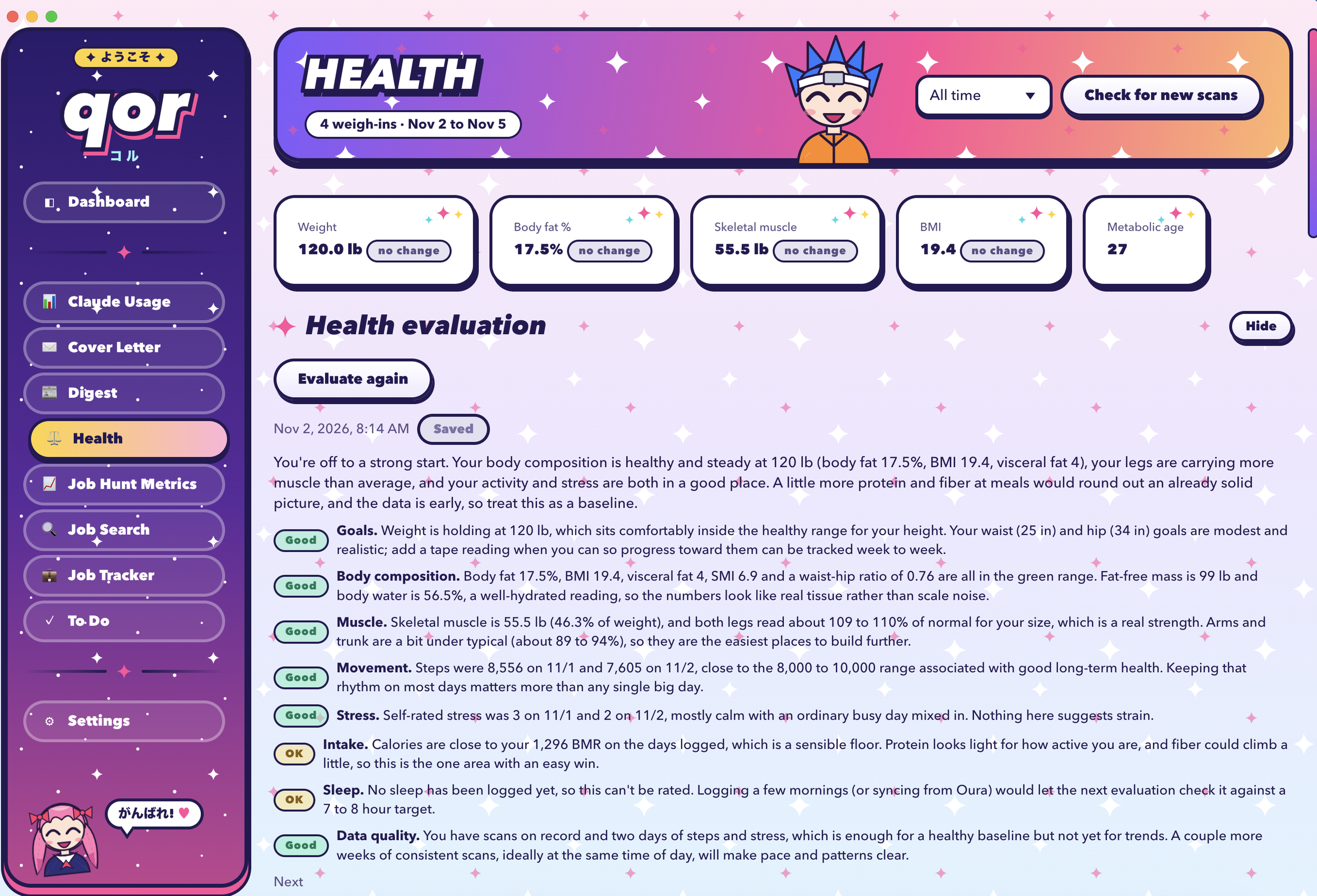
The "Evaluate my Health" button looks at the user's age, height, gender, stated goals, recent scans and measurements, and each day's food compared with their nutritional needs. It also weighs the movement, sleep, stress and exercise they have logged. The review uses a user-provided AI skill, referenced in the feature's settings panel in qor. This lets each user set their own health evaluation standard based on their particular goals and lifestyle, and leaves the evaluation fairly open as to what it does or doesn't do with the data provided.
By default, the review comes back as a set of traffic lights, one per area, each with a short plain-language note:
- Green: Good, and/or on track toward goal.
- Yellow: Drifting, or worth watching.
- Red: Moving the wrong way, or needing attention.
The tone is candid and specific. It will say that a waist measurement is improving while weight is flat, or that food has been running under the user's floor for two weeks. It also says when it cannot tell, for example when there are too few scans to see a trend. The evaluation is not medical advice. It does not diagnose, and it does not replace the user's doctor. Its job is to make the conversation with their own clinician better informed, and to make the user's own attention steadier between visits.
Whatever type of evaluation a user creates, results can be saved or deleted. Saved reviews are dated, so the user can look back over months and see whether the same concerns keep returning or have been resolved.
Privacy, ownership and trust
Health data is among the most personal data a person has, so the product is built so that the user holds it, and so that they know exactly when it leaves their machine.
Kept on the user's computer. There is no company account and no cloud copy of the user's records. Everything lives in plain files on their own machine, which they can open, move or archive at will.
Protected connections. The sign-in details for Google and Oura are stored in encrypted form, separately from the user's health records.
Safe saving and backups. Records are saved in a way that prevents half-written files, so a crash cannot corrupt the user's history. Settings and health records are backed up separately and on different schedules, so a bad change to one never overwrites a good copy of the other.
Nothing removed by accident. Turning the Health feature off hides it. It never deletes or rewrites what the user has recorded.
Where information does leave the computer. Honesty about this matters, so it is stated plainly:
- Reading a scan file, looking up the nutrition of a new food, and writing the health evaluation each use Claude. The relevant text or image is sent for that request and nothing else.
- Steps and sleep sync talk only to Google and Oura, and only when the user presses the button.
- Repeat foods are answered from the user's own saved library, which reduces what is sent over time.
Where the user is in control. The user chooses when each sync, import and evaluation happens. Nothing runs quietly in the background to collect more.
Limitations, risks and what comes next
The product is honest about what it cannot do, because a health tool that overstates itself is worse than none.
Known limitations
- The scale step is manual. The user must save each scan to the folder. If they forget, that day is missing, and nothing prompts them.
- Scans are read from images. An unusual layout or a blurry capture could be misread. A number that looks wrong deserves a quick check against the scale's app.
- Energy burn is an estimate. It rests on the scale's metabolic reading and a simple activity scale. It is useful for direction, not for precision.
- Looked-up foods are approximate. The tilde marks them so the user can weigh them accordingly.
- Sync reach is 30 days. Older steps and sleep must have been synced earlier or entered by hand.
- One person. There is no sharing, no household view and no clinician portal.
- Not medical. The review is a thoughtful second opinion and not clinical care.
Risks and mitigations
| Risk | Mitigation |
| A third-party service changes or closes access | Hand entry always works, and nothing already stored depends on the connection |
| A misread scan skews a trend | Each scan is stored by date and can be corrected |
| Data loss | Atomic saves and separate, scheduled backups |
Where it could go
- Gentle reminders - for a missed weigh-in or an un-synced week, at the user's request only.
- Longer-range views - such as season-over-season comparisons of weight, composition, and sleep, useful for identifying seasonal affective disorder or similar issues.
- A one-page summary - for the user's doctor, drawn from their saved reviews and trends and printable as a report.
- Cycle-aware context - logged manually or synced from a tracking device, so that natural monthly shifts in weight, sleep, and energy are read in the right light.
- Health profiles - different health evaluation and goal metrics saved in a profile so users could switch between modes (e.g. "pregnancy", "post partum", "weight maintenance", "marathon training", "stress reduction", "weight loss" and so on) without having to re-enter any config data. The feature would note the profile being used in its tracking data as well.
- Speech-to-text - for the nutrition component to avoid having to type in food entries. This would be especially useful if qor ever became a hosted app. Entering meal info could be done on-the-go from the user's phone.
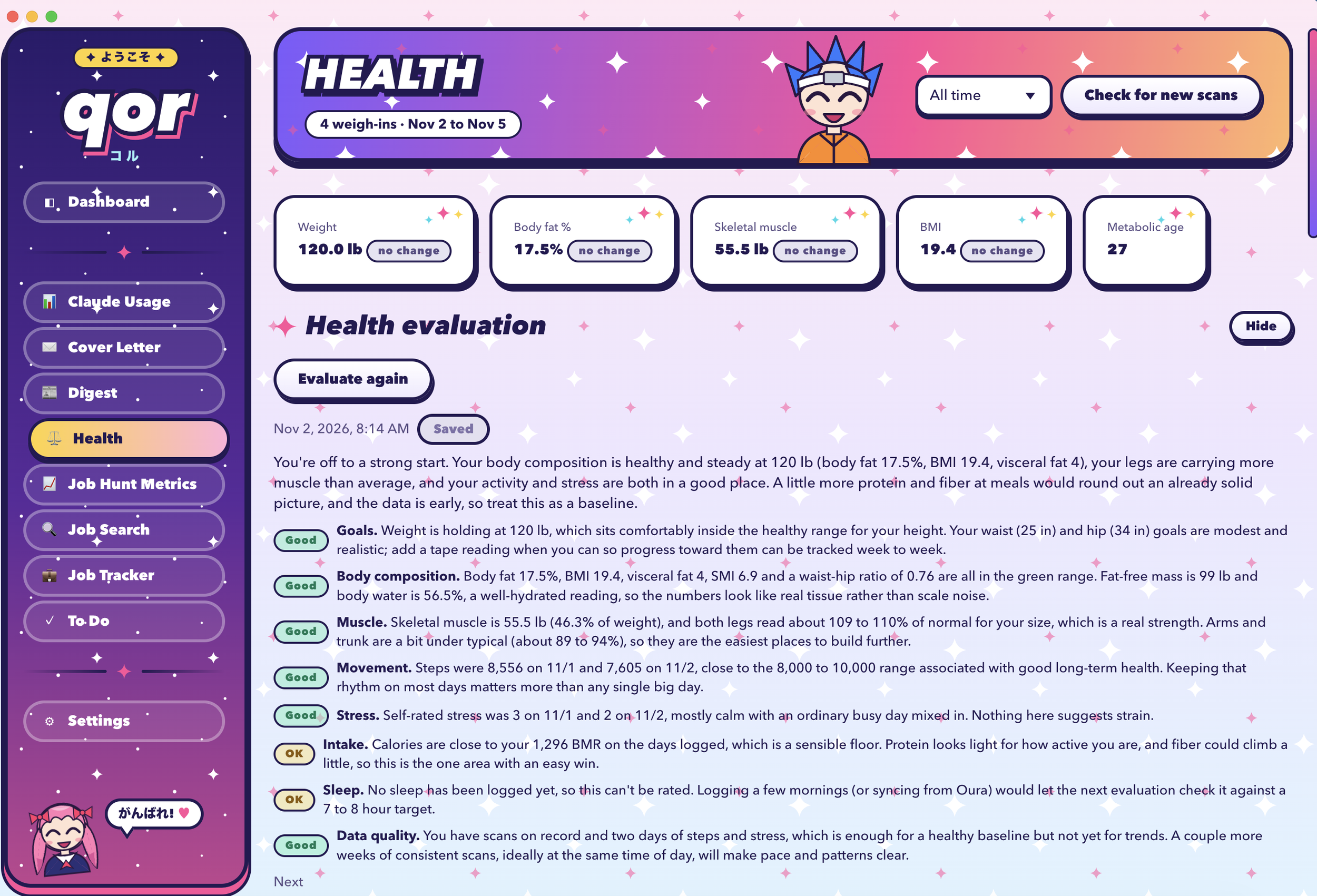
Health evaluation (Kawaii theme)
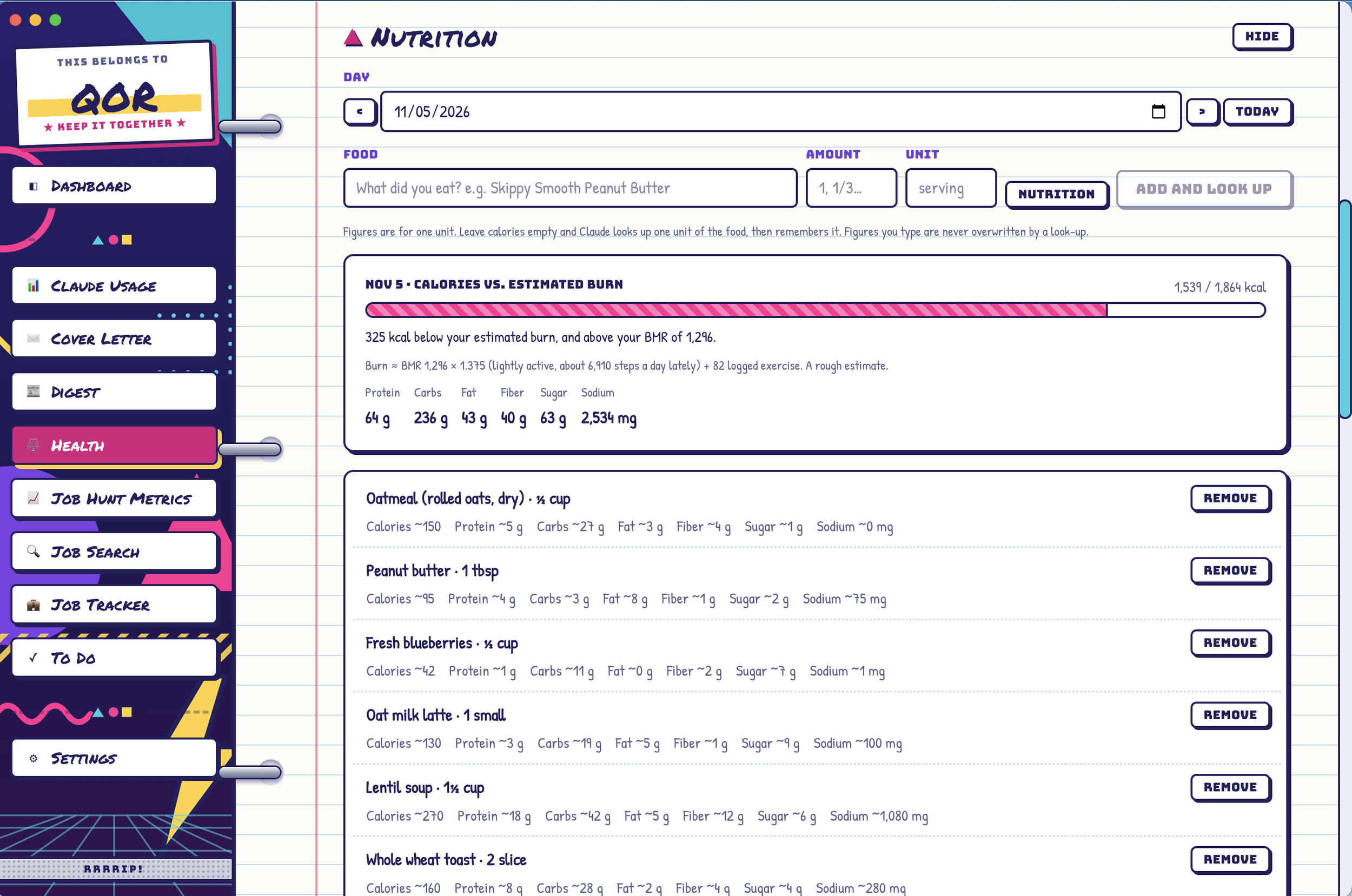
Nutrition log (Trapper Keeper theme)
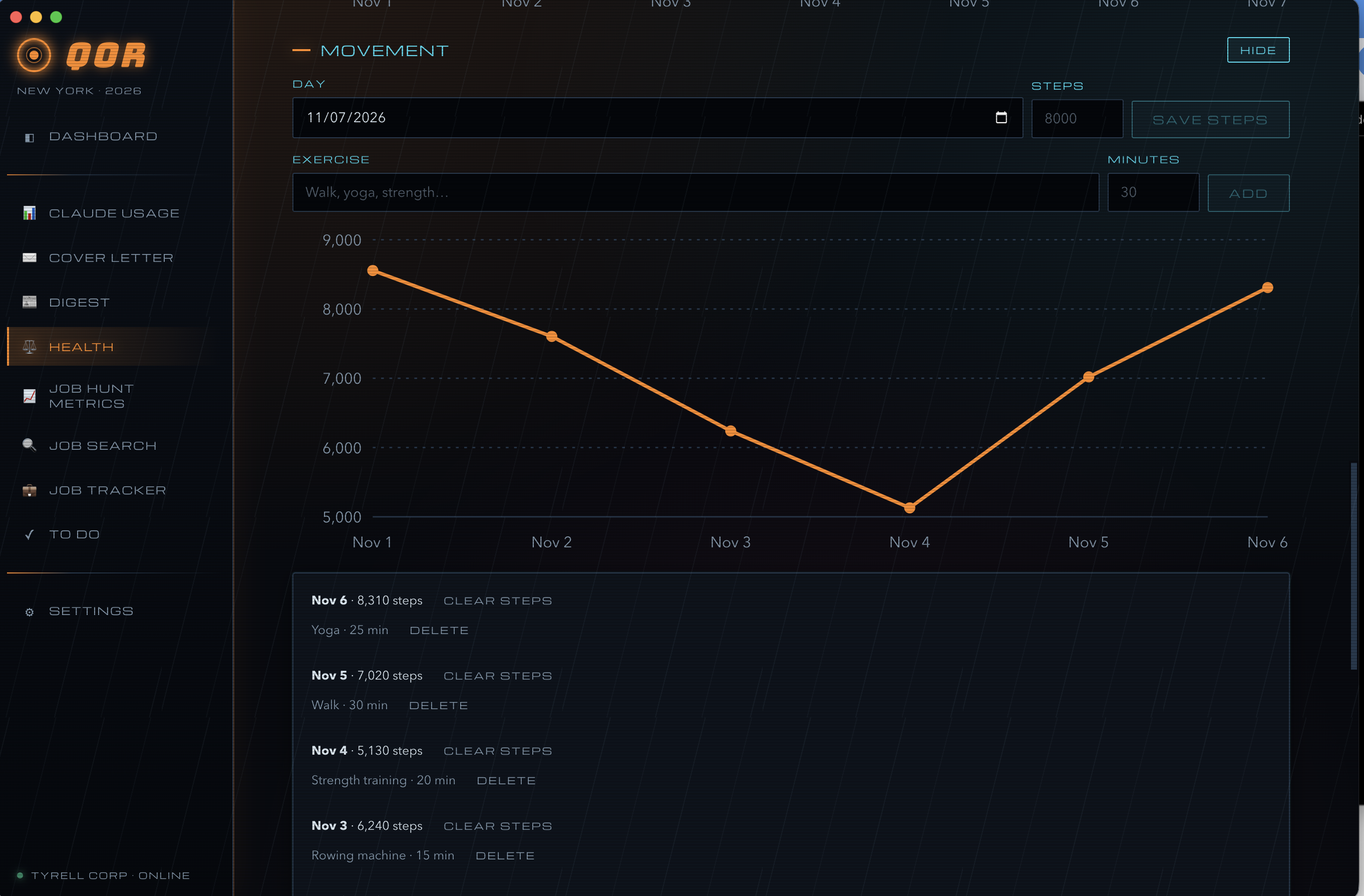
Movement (Neo Noir theme)
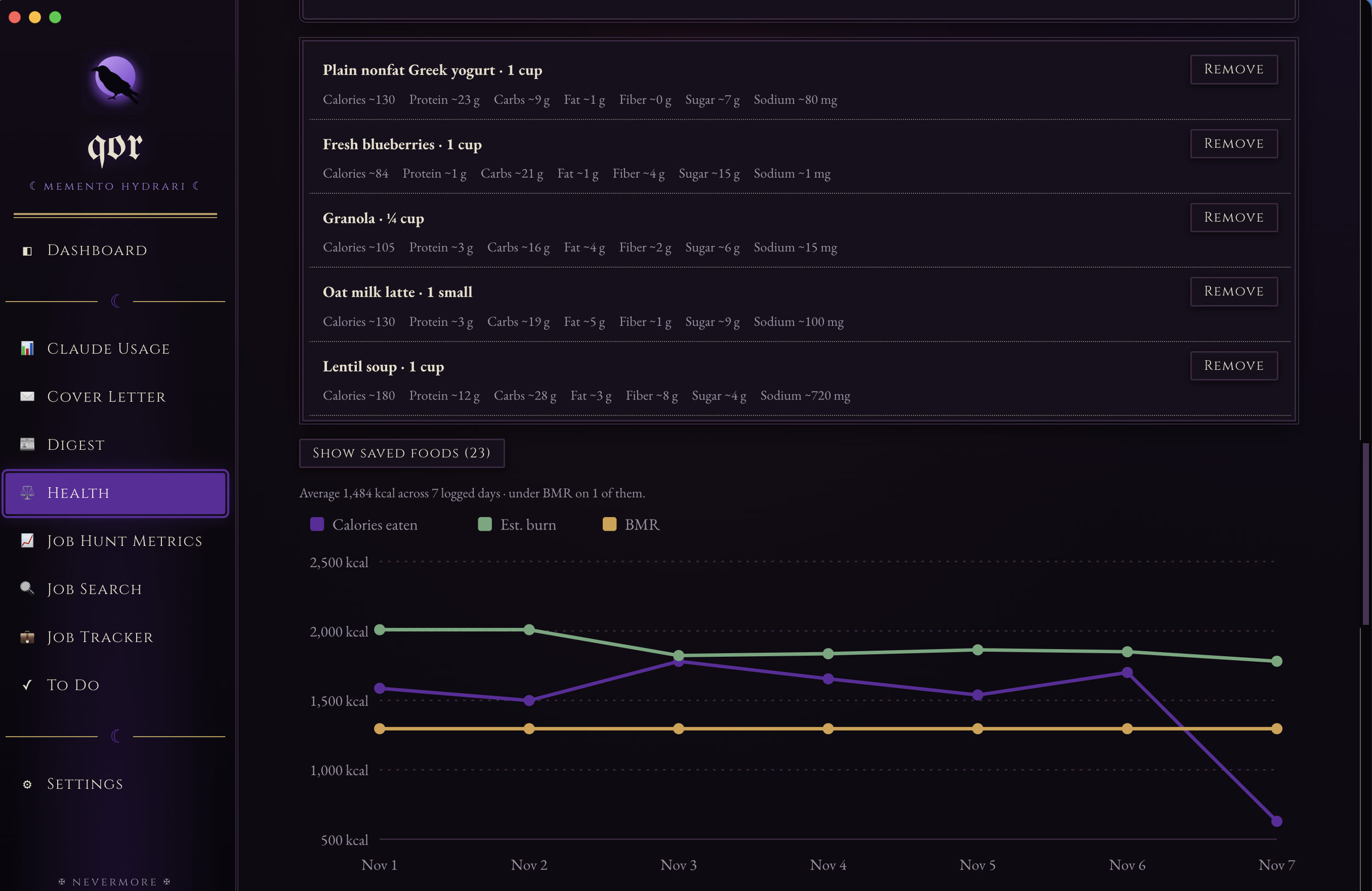
Caloric tracking (Goth theme)
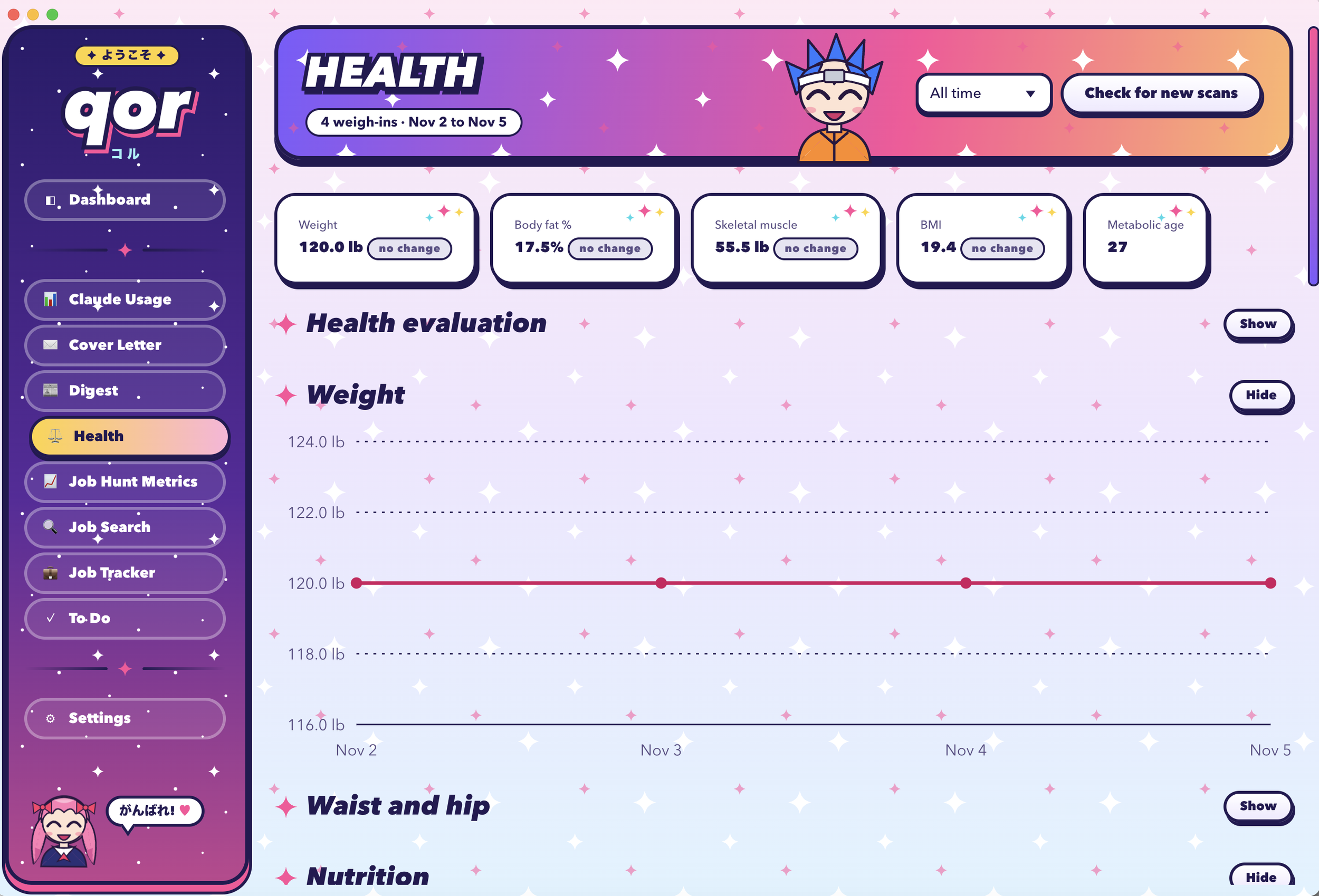
Weight tracked against a goal (Kawaii theme)
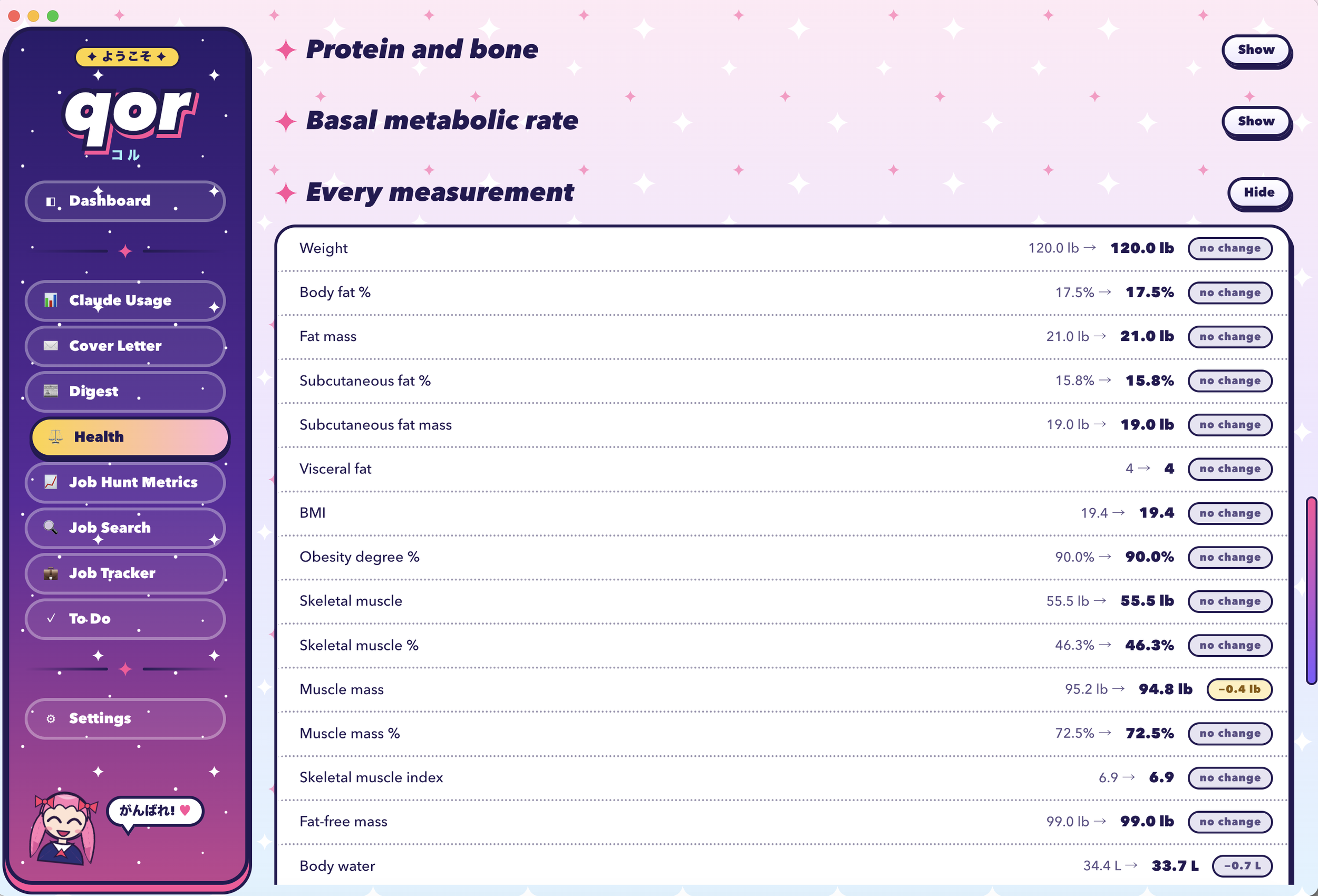
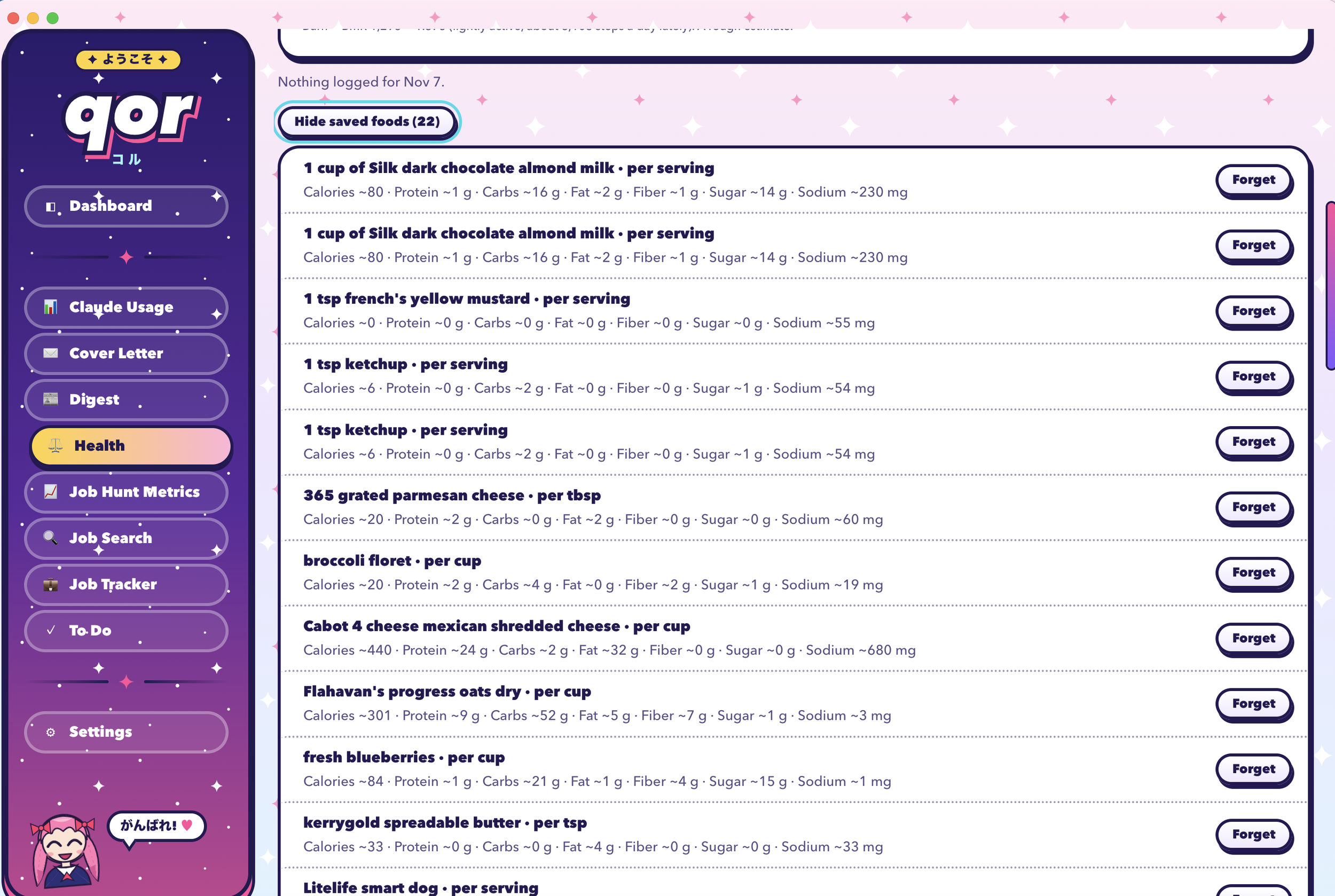
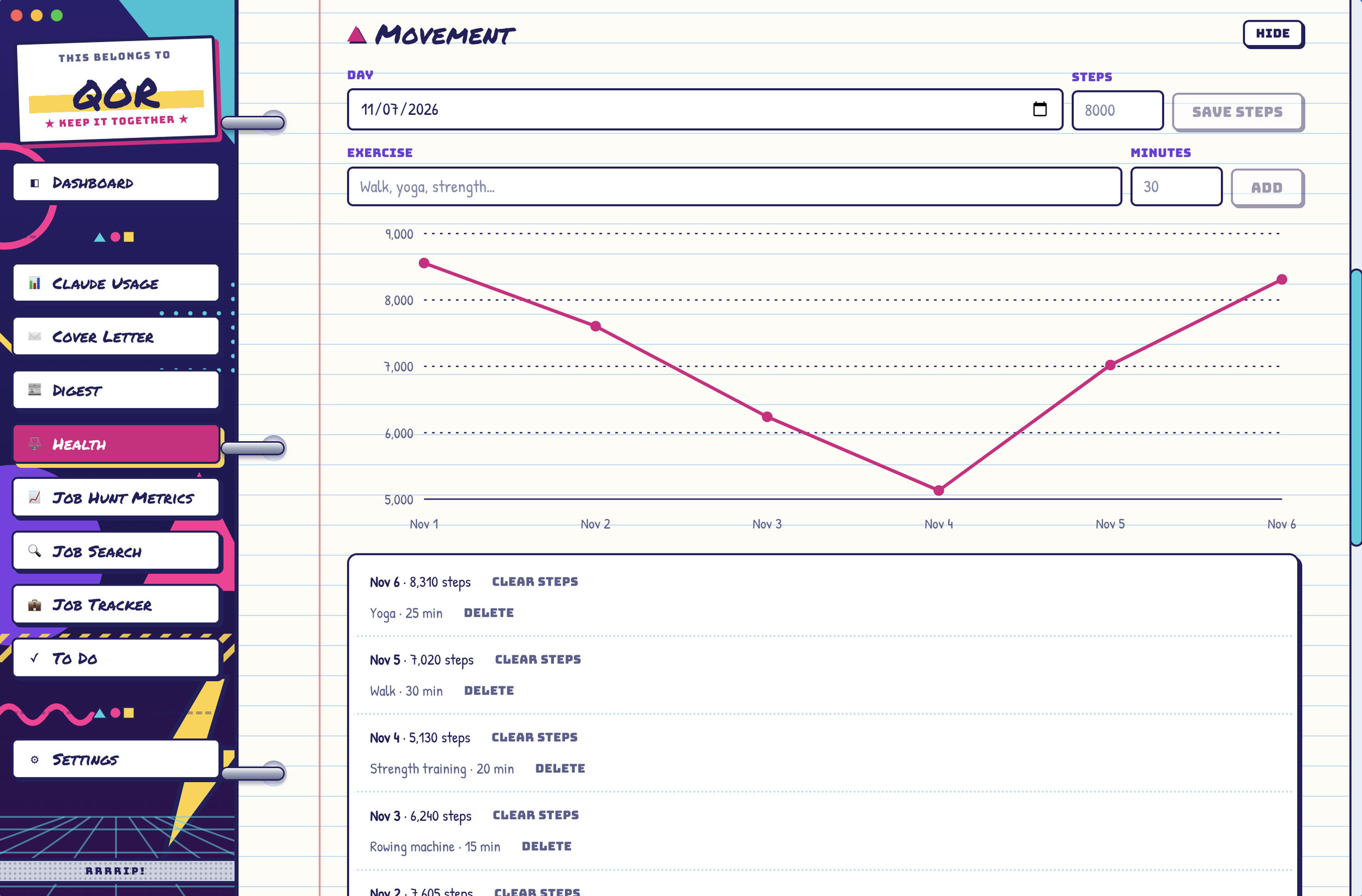
Movement (Trapper Keeper theme)
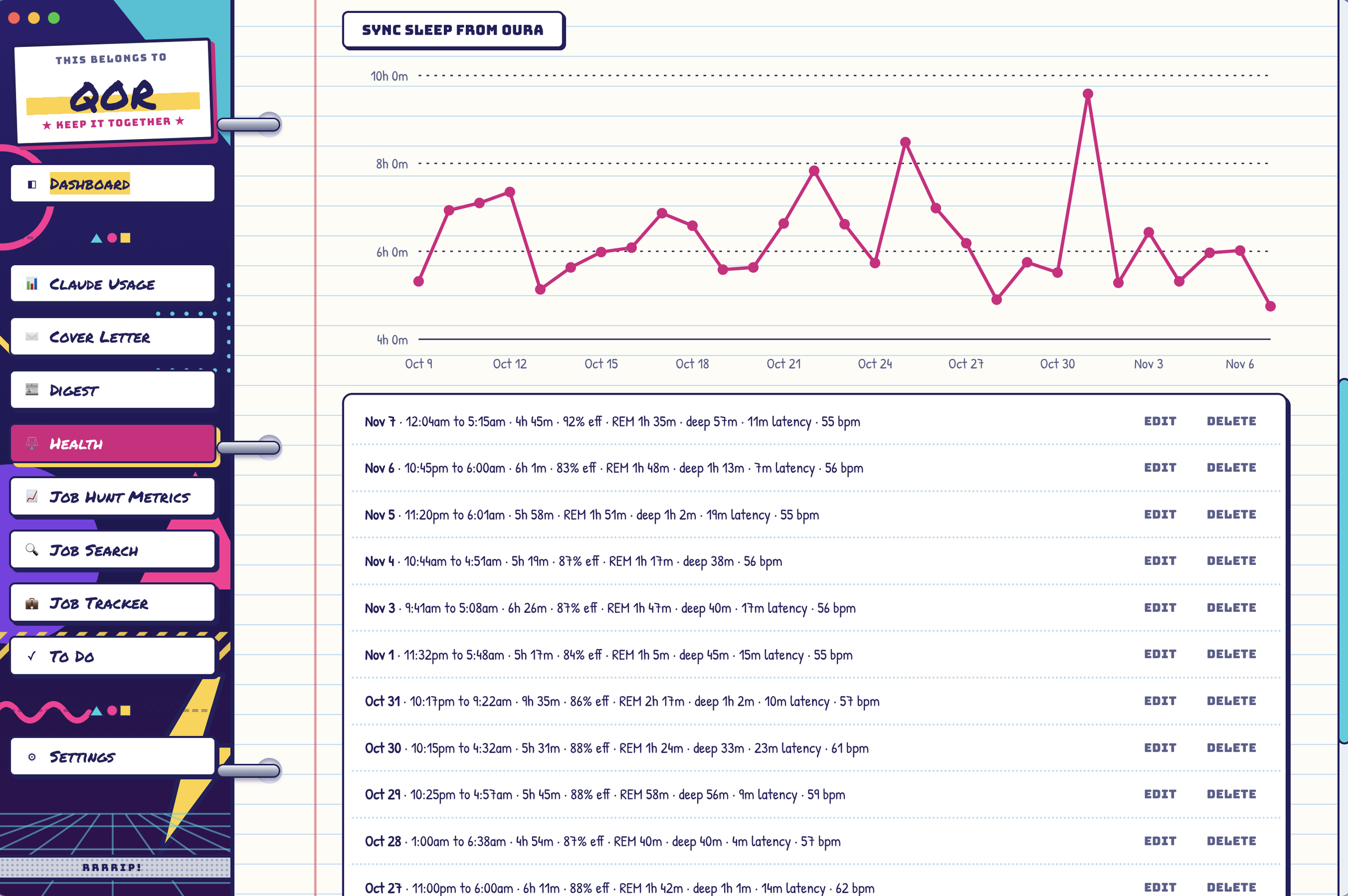
Sleep stats sync'd from my Oura ring (Trapper Keeper theme)
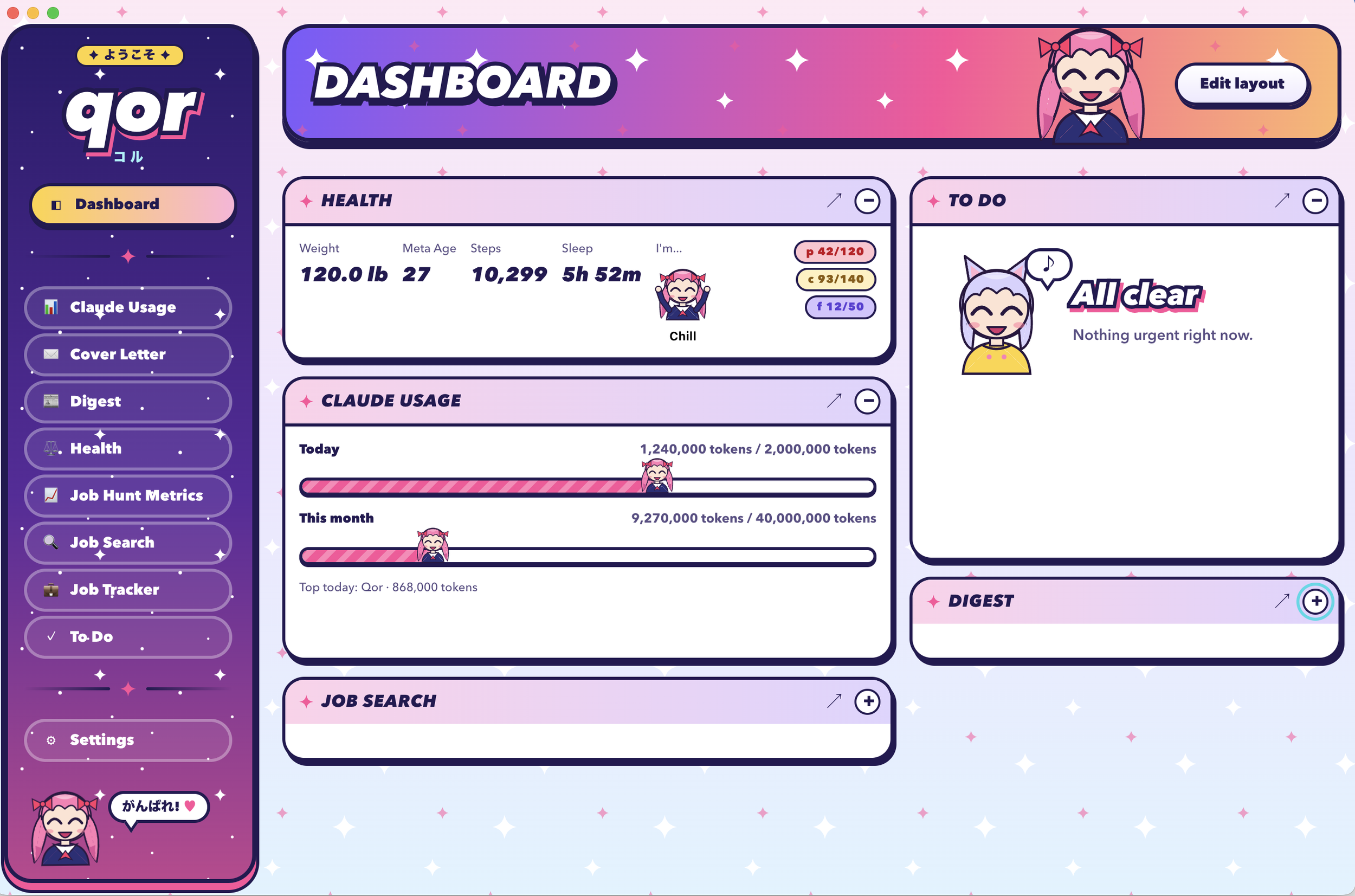
Health Widget on dashboard (Kawaii theme)
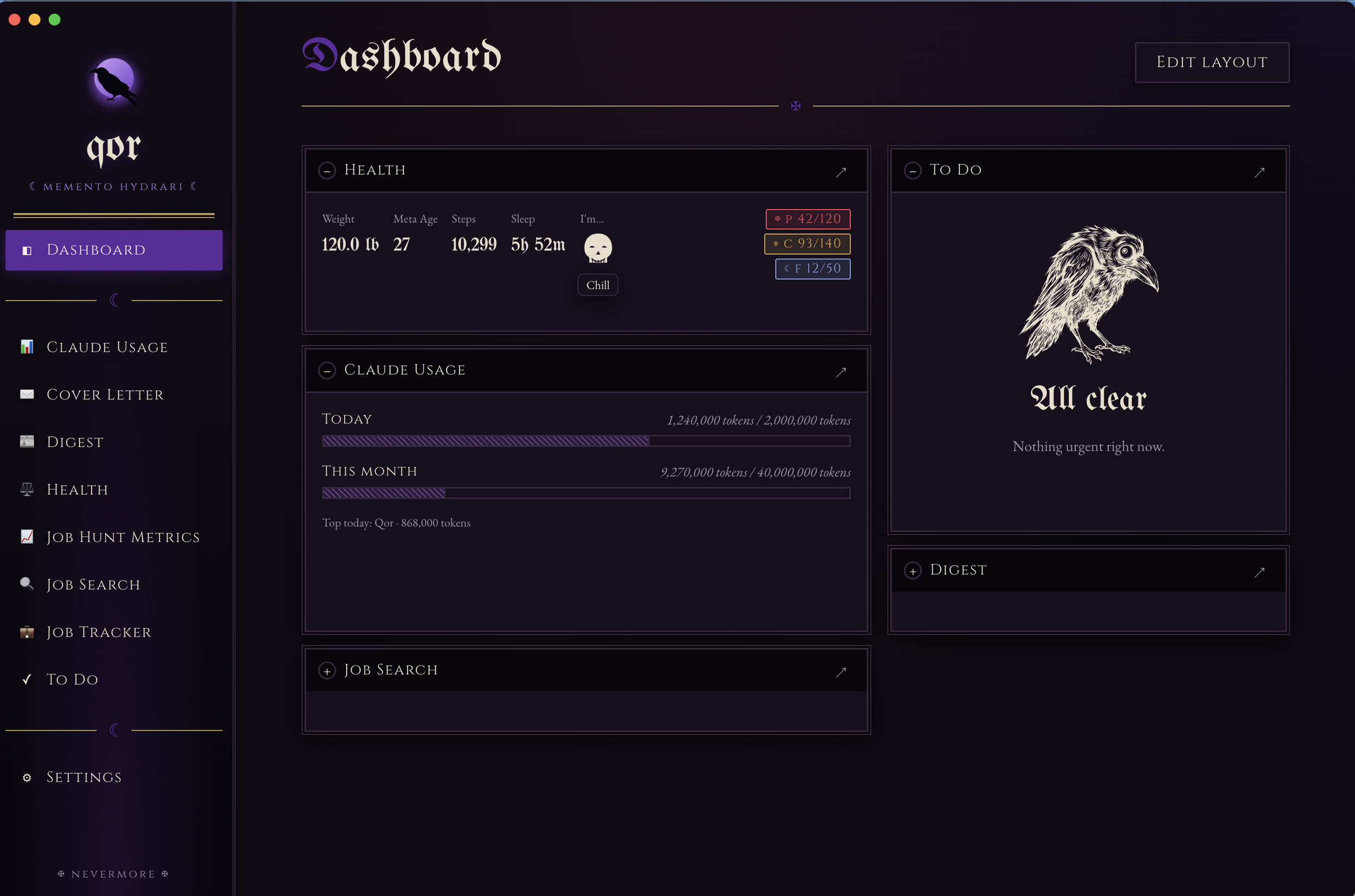
Health Widget in dashboard view (Goth theme)
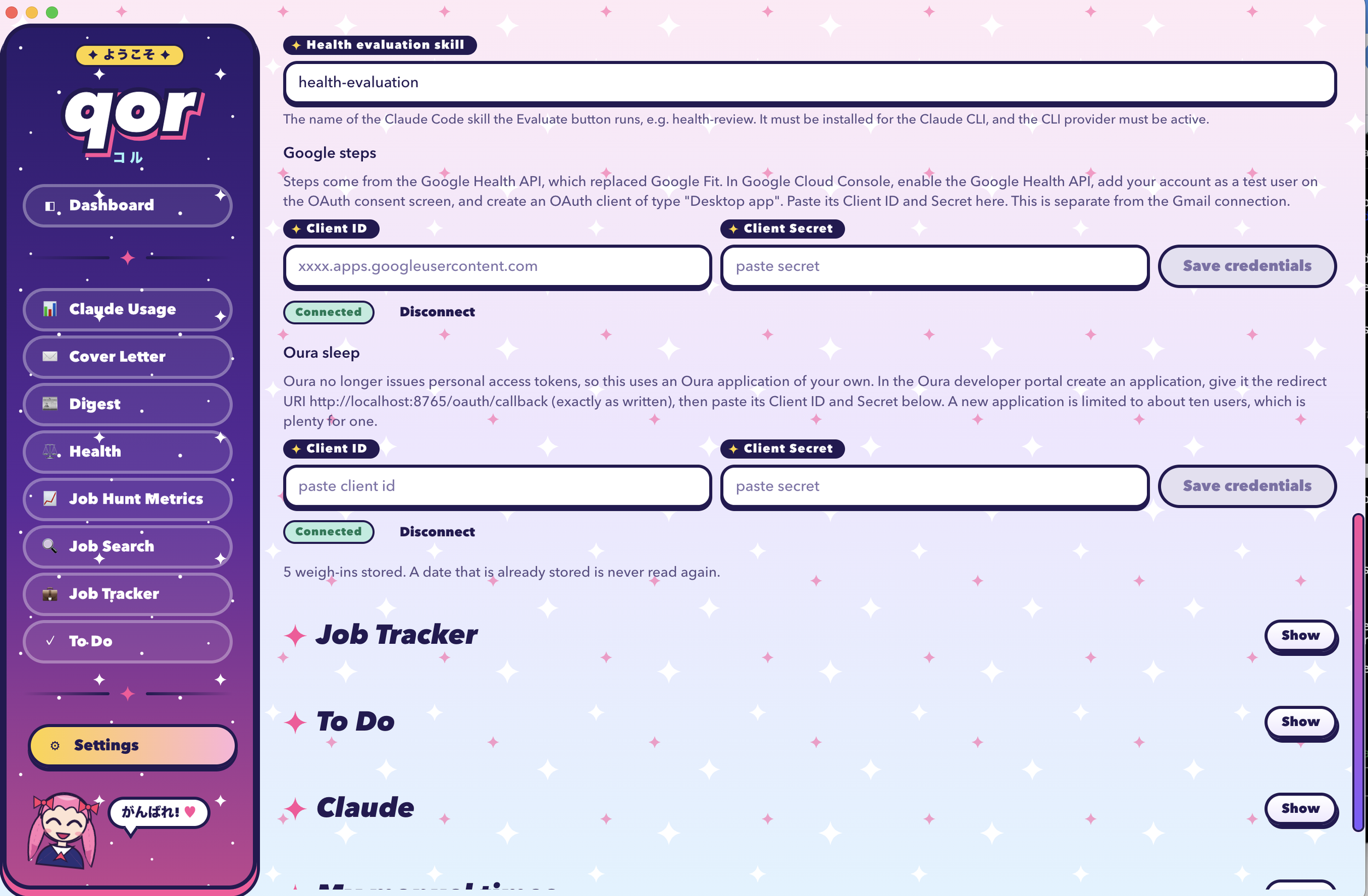
Health settings panel (Kawaii theme)